November 2025 Product Feature Updates
As teams ramp up for end-of-year projects, training programs, and client sessions, HiLink is introducing updates to make virtual collaboration smoother, smarter, and more efficient.
This month’s releases focus on improving large-scale scheduling, simplifying in-session navigation, and delivering faster, clearer post-session visibility.
Before Class
Bulk Meeting Creation via API
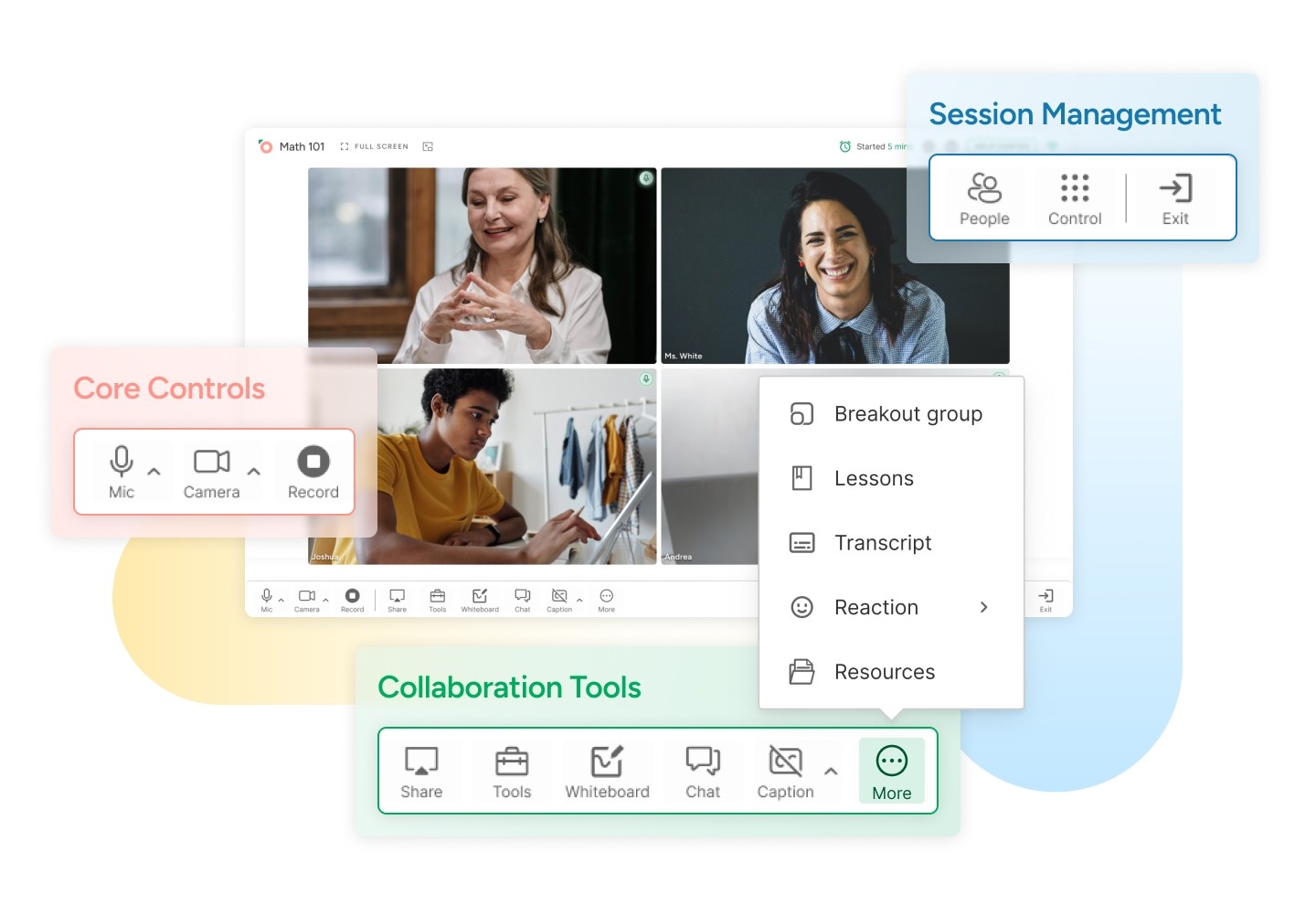
A cleaner, smarter way to navigate live sessions. The redesigned Toolbar Layout introduces a more intuitive structure that organizes tools into clear sections — core controls on the left, collaboration tools in the center, and session management options on the right.
This new layout allows for better organization and management of all functions as we roll out more features, making the user experience simpler and more intuitive.
Tip: Organizations can enable the new layout through their account manager or directly via rollout flags starting late October.
During Class
New Toolbar Layout UI
Teachers now have more control over classroom access. Students that are removed by the host cannot rejoin without manual approval, while students who leave voluntarily or disconnect can re-enter automatically.
Early Recording Packaging
End a session, and your recording begins processing immediately — no more waiting for the scheduled end time.
The Early Recording Packaging feature ensures that recordings are packaged and available as soon as the host finishes the session, saving hours of processing time and getting content into your hands faster for review, sharing, or archiving.
After Class
Session Playback Diagnostics Overlay
Investigate playback issues with precision. The new Session Playback Diagnostics Overlay helps support and admin teams see what happened during a session — with timestamped logs showing microphone events, permission errors, connection drops, and more.
Available as downloadable summaries and, in future phases, as a visual overlay within the playback timeline, this tool makes troubleshooting faster and more transparent.
Tip: Diagnostic logs are stored for 30 days and can be linked directly to playback for quick analysis.
Looking Ahead
November’s updates focus on building a stronger foundation for reliability and efficiency — from scheduling hundreds of meetings with one API call to instantly accessing recordings and diagnosing playback issues with clarity.
As we head into the final stretch of the year, HiLink continues to evolve as a powerful, flexible platform for organizations that depend on seamless virtual collaboration — helping every meeting, class, or training session run more smoothly from start to finish.
Streaming: Engagement & Accessibility Update
Large-scale sessions do not have to be silent to be effective.
Today, we’re introducing new audience engagement and accessibility tools for HiLink’s Streaming Mode, designed to make large, view-only sessions more inclusive, responsive, and controlled, without sacrificing the stability that Streaming Mode is built for.
What’s New in Streaming Mode
Streaming Mode has always been optimized for scale. It supports large audiences through a streamlined, view-only interface while presenters operate from the full HiLink classroom.
With this update, Streaming Mode now supports:
Live captions for real-time accessibility
Polls to collect instant feedback from large audiences
Emoji reactions for quick, non-disruptive participation
Chat moderation tools that let hosts control when and how viewers engage
Together, these features extend Streaming Mode beyond passive viewing, while preserving its core strengths: performance, simplicity, and control.
Why This Update Matters
Streaming Mode is commonly used for orientations, public webinars, town halls, and large classes, where traditional classroom tools would overwhelm both hosts and attendees.
In these environments, interaction needs to be intentional.
This update helps teams:
Improve accessibility through real-time captions that support diverse learners and accessibility requirements
Encourage participation with lightweight engagement tools that do not interrupt the session flow
Maintain control using moderation features that prevent chat overload and distraction
The goal is not to turn Streaming Mode into a classroom. It is to provide just enough interactivity to keep audiences connected and included.
New Capabilities, Explained
Live Captions
Real-time speech-to-text captions improve accessibility and comprehension for viewers, helping organizations meet accessibility standards and support diverse learning needs.
Polls
Hosts can create and launch live polls during a stream to gauge understanding, sentiment, or audience needs in the moment.
Emoji Reactions
Viewers can respond using emojis as a quick signal of understanding or engagement, without interrupting the presenter.
Chat Moderation Tools
Hosts can enable or disable chat for the entire stream, keeping conversations focused and manageable during large sessions.
Common Use Cases
These tools are already being used across a range of scenarios:
A virtual open house adds live polls and moderated Q&A to capture attendee interest
A founder town hall uses reactions to gather real-time audience feedback without interruptions
A test-prep stream runs quick pulse checks mid-lecture to adjust pacing
A literacy program streams a large reading event with live captions for accessibility compliance
Availability
All engagement and accessibility features are available now in Streaming Mode for institutional clients.
To enable Streaming Mode: Select Streaming Mode in the HiLink Dashboard or pass hasStream: true when creating a meeting via API
To use captions, polls, reactions, and chat controls: These features appear automatically in the Streaming Viewer interface. If you do not see them, contact your HiLink account manager to confirm tenant enablement